
Run GitHub Actions locally.
Use the workflow your repository already has. Runnr runs it through act on your Mac, with your working changes included by default.
Get your Mac ready
You need macOS 13 or later, Git and a repository containing .github/workflows. For Linux jobs, start Docker Desktop, OrbStack or another Docker-compatible engine. Check your engine’s system requirements too. The signed, notarised universal Mac release supports Apple Silicon and Intel.
Download Runnr from the customer portal and activate your licence. An individual licence is £19.99 for one person on up to 3 Macs; see the update and renewal terms. In Runner & app settings, install the managed act runner. A global act installation is not required.
These read-only commands help check setup in Terminal. Git should print a version and Docker should report a running server. A Docker client alone is not enough.
git --version
docker info
Open your checkout
Choose Open project or press ⌘O, then select the repository root. Runnr discovers workflow files, jobs, events and static matrices. Resolve any reported YAML error before running.
Use your existing workflow first. Running leaves its repository file unchanged. The run’s Workflow tab shows the generated execution snapshot for inspection. Local adaptations are kept separate from the file in your checkout.
Choose the checks
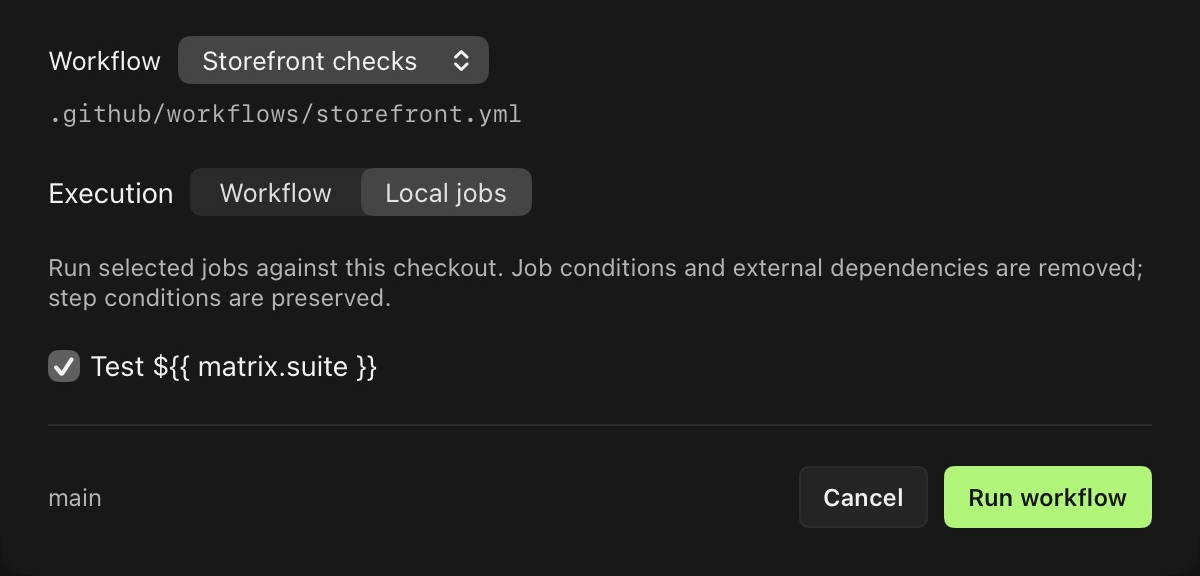
Open Run workflow. In Workflow mode, choose an event the workflow handles and supply the inputs or custom JSON payload it needs. This mode retains workflow trigger conditions and job dependencies.
Local jobs runs selected jobs, including their static matrices. It excludes unselected jobs, removes dependencies on omitted jobs and bypasses the selected jobs’ top-level conditions. Dependencies between selected jobs and their step conditions remain.
If a selected job needs an output from an omitted job, include that dependency or provide suitable local configuration. A subset does not make a GitHub API-dependent workflow self-contained.
Scroll to explore. Open the full-size view for details.
Run your working changes
Keep Working tree checkout enabled in Project settings to include uncommitted changes. A remote checkout instead lets actions/checkout run normally. Host mode creates a separate committed checkout for remote execution so checkout cleanup cannot touch your source directory.
Supply only the values the jobs need in Secrets & variables. Import repository or environment variables from GitHub as a local snapshot if useful. GitHub supplies secret names only; sensitive values must be added locally. Saved credentials are encrypted, and configured secrets are redacted from displayed and retained logs.
Start the run and follow its live logs. The first run may need time and network access to download runner images, actions and packages. Recognised deployment jobs wait for a decision in the app; local approval gates do not reproduce GitHub environment reviewer policies.
Try a small workflow
This example checks for a non-empty README.md. In a disposable repository, save it as .github/workflows/local-check.yml and add a README. It is an example to exercise the loop, not another file Runnr requires.
name: Local check
on: [push, workflow_dispatch]
jobs:
  test:
    runs-on: ubuntu-latest
    steps:
      - uses: actions/checkout@v4
      - name: Check the README
        run: test -s README.md
Select Local check and run it. Empty the README without committing, then run again: test -s should fail. Restore its content and repeat the run. You have tested working-tree changes without pushing.
See GitHub’s workflow tutorial for the underlying file format.
Inspect, fix and repeat
Open Results for supported test feedback and diagnostics, then follow the source or log links. Search Logs for the surrounding output. A successful command with no recognised test output shows completion without estimated test totals.
Edit the code, choose Run again and review the restored setup. History retains the previous attempt. The failure guide covers supported formats, JUnit artifacts, comparisons and CLI/MCP failed-job requests.
Close the window to keep a run going in the background. Use the menu bar to check progress, return to logs or cancel. You can also prepare runs through Spotlight and Shortcuts; preparation returns to the normal app review.
A local pass describes that local execution. Review runner image and GitHub feature differences, then use your required hosted checks for final verification.